
Raquel Moss
Technology Editor 2013
Articles by Raquel Moss
24 articles found. Displaying page 1 of 2.
-
Culture
Issue 26 06/10/2013
App of the Week | Issue 26
In the haze of information overload that is study week, it’s easy to be overwhelmed by all the shit you’re meant to know. Sometimes, putting it into order in a way that makes sense to you can help to soothe the hysteria. Time to make your Year 9 English teacher proud and create some sweet mind-maps. If you love mind-maps but hate paper, Mindmeister is the app for you. Use Mindmeister to create digital mind-maps on your computer or tablet – you could structure potential exam essays, map out notes on a particular topic, or procrastinate by brainstorming ideas for your OE when you finally get out of this joint. You can share your mind-maps with friends and they can edit them if you allow it. Either way, like your Year 9 English teacher said, failing to plan is planning to fail, so don’t plan to fail. Use Mindmeister, conserve paper, access it anywhere, and pass that exam.
-
Culture
 Issue 26 06/10/2013
Behind the Meme
Remember your horrible high school class photograph? Or the embarrassing childhood picture that your Mum posted to her Facebook? (Thanks, Mum.) What happens when the Internet gets hold of those photos and, based on that one photograph, assigns you a personality? Do you roll with it? Exploit it? Or do you try to reclaim your identity? Let’s think, for a moment, about the people (or animals) behind the meme. Grumpy Cat is, according to her humans, a happy little kitty. Bad Luck Brian is in fact quite lucky, having once won an Xbox and a Playstation in the same fortnight. Overly Attached Girlfriend’s personality bears more resemblance to Good Girl Gina, the Internet’s unattainably cool, sexy and laid-back girlfriend. Hipster with a Typewriter is just trying to make an honest buck. Sadly though, Scumbag Steve seems to be a scumbag in real life. How do these meme stars reconcile their personalities with the online persona that has been bestowed on them? Hipster with a Typewriter’s case is a study in what not to do if you suddenly become a meme. Several months ago, a photograph appeared on Reddit’s front page. It showed a pale, skinny guy, dressed like your garden-variety hipster and tapping away at a vintage typewriter … at a park. What a douchebag hipster, right? What the fuck, man … does he think he’s too good for a MacBook now? A fucking typewriter – are you serious? Actually, the guy was just trying to earn a buck. In a recent op-ed at theawl.com, C. D. Hermelin explained himself. On nice summer days he takes his typewriter to parks in New York and writes stories for passers-by in exchange for a few dollars. This is a charming and novel idea, but the photograph unfortunately cropped out Hermelin’s sign and money-box. It was captioned, “You’re not a real hipster until you take your typewriter to the park.” Hermelin wasn’t prepared for the chaos that hit him when the Internet latched on to his photograph and projected all their seething hipster-hate upon him. “I … felt thrown when I was presented with an image of myself that I couldn’t control,” Hermelin stated in his op-ed. So what can you do? How can you regain control? Hermelin tried to explain his story-writing pursuit on Reddit, and received a few apologies. His photograph is still making the rounds on the Internet, though, without the necessary context. Though he tried to ignore it, the negative attention and threats of violence impacted him deeply and concerned his family. Others have taken a more light-hearted approach to addressing their meme-status. Overly Attached Girlfriend (her real name is Laina Walker) embraced her alter-ego and even has a YouTube channel featuring Overly Attached Girlfriend. A photograph of her staring creepily into the camera and looking intensely fixated is usually accompanied by phrases such as “I wish I could cut a hole in you and live inside your stomach so we would never have to be apart.” Her status on the Internet, plus her good humour and personality, has even helped her to gain some success as a television presenter. Bad Luck Brian (his real name is Kyle) has similarly embraced his meme status with good humour, collaborating with Walker to produce an “Overly Attached Girlfriend meets Bad Luck Brian” video and subsequently launching his own YouTube channel. He’s not as ill-fated as the meme would have us think, but Kyle seems to have embraced the idea that there is a little Bad Luck Brian in all of us, and sometimes it’s good just to laugh about it. Anyway, back to your terrible childhood photograph or dorky high school class photo. In the unlikely event that the Internet does get hold of it and dubs you “Bad Perm Stacey” or “Overly Enthusiastic Owen,” you have some options. If your meme is popular, milk that fucker for all it’s worth – play the game, say the line, and watch the adoration (and, probably, money) roll in. If not, deny, deny, deny. Refuse to admit that it is you. Do not read the comments and do not engage. Either way, just remember that your fame came from an unlikely fluke and will probably be gone again just as quickly. After all, the Internet has a short attention span. Ain’t nobody got time for old memes.
-
Culture
Issue 25 29/09/2013
Web Trick of the Week: The Wadsworth Constant
The Wadsworth Constant: Noun. An axiom stating that the first 30 per cent of any video can be skipped because it contains no worthwhile or interesting information. Popularised by Reddit user Wadsworth in 2011. (knowyourmeme.com) It’s true though, isn’t it? Pretty much any how-to video begins with several minutes of some guy telling you useless information, or some makeup blogger talking about the new brushes she bought before showing you how to do your eyeliner. &wadsworth=1Skip the boredom by applying the Wadsworth Constant to your YouTubeing. There’s a few ways you can do this: add the string “&wadsworth=1” to the end of the URL of your YouTube video (thanks, Google engineers!), or click on the video and then tap the number three on your keyboard. Actually, tapping the numbers one through nine on your keyboard will allow you to jump to 10 per cent to 90 per cent of the way through respectively. There you have it, procrastinators, a way to YouTube more productively!
-
Culture
Issue 25 29/09/2013
Checking in on Yahoo!
It has been a year since overachieving, Silicon Valley poster-girl Marissa Mayer (formerly of Google) took over as CEO of Yahoo! There has been a lot of buzz about Yahoo! recently, what with Mayer’s acquisition of several start-ups, the re-vamp of Flickr, and a logo change. I decided it was time to finally check out Yahoo! and have a play around with its services. I’m fascinated by Mayer, who is undeniably brilliant and stubborn and does things her own way. She has gained a reputation over the years for being difficult, and is obsessed with user experience. At Google it became apparent that she likes to be in absolute control, even if it means bottlenecking progress at the company. Her policies so far have been controversial – she’s banned working from home, for instance. The role of a CEO can sometimes mean little more than a figurehead and a large salary, but I have no doubt that Mayer is taking a very hands-on and assertive approach to running Yahoo!. The tech world is rightly interested to see where things will go with the company under Mayer’s control. Deep breath now. For the first time since 2002, I visited Yahoo!. Yahoo! NZ loaded and I was underwhelmed. Mayer clearly doesn’t have her clutches on the international sites yet, as Yahoo! NZ is still rocking the old-school Yahoo! logo and Century Gothic typeface. Aside from the typeface, it wasn’t terrible. It showed a mash-up of news similar to the front page of Stuff. I can see the appeal for people like my mum. I clicked over to the US Yahoo! site and was immediately overwhelmed. There in the top right corner was the new Yahoo! logo, purple and … animated? Weird. As for the rest of the page, it looked like Buzzfeed and The Huffington Post mated. Lots of news, lots of click-bait, lots of headlines. I checked out a few other Yahoo! sites. The design is inconsistent, but no doubt several of the sites will be revamped within the next year. News, Sports, and Finance aggregate stories from popular websites, while the Games site offers your usual range of Zynga-esque games without the annoying prompts to “invite your friends.” Yahoo! Answers is its good old stupid self, and Screen is YouTube for Yahoo!. Actually, I quite liked Screen – the interface is quite intuitive and there are fewer idiotic/ racist/ sexist comments. I also enjoyed Shine, Yahoo!’s “life and style” section (read: gossip, recipes, manicures and articles about sex for when you’re feeling particularly hormonal), and will probably visit again when I have a block of chocolate and a giant pimple on my chin. I decided to try the new “My Yahoo!,” which hopes to replace the nixed iGoogle. In fact, you can even import your iGoogle information to My Yahoo!. I dispensed with iGoogle a few years ago, so created My Yahoo! from scratch. I signed in with my Google Account (weird) and my page was automatically populated with several RSS feeds, weather information for Sunnyvale, California, and horoscopes. If you’re in the market for an iGoogle replacement, My Yahoo! is quite nice looking and will probably serve you very well. Overall, my visit to Yahoo! wasn’t as abjectly awful as I thought it would be. There’s heaps of inconsistency, which is only to be expected. Yahoo! has become a beast with many heads that will take time to tame, and Mayer’s reforms at Yahoo! are only beginning to have traction. Yahoo! remains a little ambiguous – their search engine is powered by Bing, their content comes from all corners of the web, and their services run the gamut from finance to dating and shopping. At the core of all these services is the hope to change people’s habits, making Yahoo! their first stop on the web and their preferred gateway to information.
-
Culture
Issue 24 22/09/2013
App of the Week | Issue 24
With semester two’s end now in sight, some of you might be thinking about your entrance into the working world. It’s going to be a little tough. Someone is going to expect you to be reasonably dressed and coherent by 9am, and to labour for eight hours toward vague and mystifying goals. You may have to use the phrase “working in silos,” or learn how to operate a fax machine (yes, really). Here’s a little advice: make sure your teeth are brushed, and carry mints with you. Brush your hair, check your flies and make sure your skirt isn’t tucked into your undies. Use deodorant. If you’re in an office job, you’re going to be stuck in a small space with a bunch of people who may or may not be pricks. Soon, the little things will start to annoy you – the loud breather, the clacky typist, the apple cruncher. Please don’t be that person. If you are that person, eventually someone is going to have to have to have a very awkward conversation with you. You may even find a box of floss placed suggestively on your desk. That is, unless this week’s app comes into common use! Hot Mess allows you to let others know, discreetly and anonymously, that their breath smells like a sewer or that there’s something green and gooby in their teeth. The app sends a text message, and warns the receiver to open the message in private, thus making the “uhh, there’s a gross booger in your nose” conversation much less awkward. “This is intended to break a social taboo,” says Hot Mess’ creator. “If someone is a close talker and has halitosis, or is too loud, it’s hard to share that without offending them. Why? You’re doing them a disservice by not telling them.” Technology! Helping humans to avoid awkwardness since aaaaaages ago.
-
Culture
Issue 24 22/09/2013
Turning the Self Into a Statistic
“I was surprised to find myself so much fuller of faults than I had imagined, but I had the satisfaction of seeing them diminish.” – Benjamin Franklin Benjamin Franklin, noted Renaissance Man of the American Enlightenment, was a well-known advocate of self-improvement. He famously kept track of thirteen personal virtues every day in the quest for moral perfection, and was notoriously productive (and prolific) in his endeavours. If old man Franklin were alive today, he’d probably be a lifelogger and self-quantifier. Lifelogging is a movement that promotes the use of technology to track, weigh, measure and calculate just about any area of life. With the meteoric rise of smartphone culture, most of us are walking around these days with a GPS, pedometer, diary and camera in our pocket. Lifelogging takes advantage of these tools, allowing you to measure and catalogue your life and create objective data by which to measure your achievements and failures. Sound a bit intense? It is. With the help of technology you can record: - How many steps you take each day, and where you take them (pedometer apps) - How much exercise you’ve done, and your heart rate throughout (Nike Fitbit) - What you ate and the calories therein (MyFitnessPal) - When, how well, and for how long you had sex (Spreadsheets iOS app) - Your mood at various intervals (Moodpanda) - Which websites you spend your time on, and for how long (browser extensions) - Which Facebook friends you interact with the most, and which of your posts are popular (Wolfram Alpha) - How well you sleep every night (Sleep Cycle) And pretty much anything else you could care to measure. Several currently-trending apps take photographs at set times during the day, or prompt you to film one second per day in order to eventually create a short film of daily snapshots. Andy Warhol would love that shit. I admit that I’m fascinated by, and engage in, a little self-quantifying. Why? Because statistics are sexy. Let’s face it, if you want to achieve something, having some solid statistics to go on will help. Maybe you want to lose weight. Maybe you think you’re doing well at eating healthy things, and you congratulate yourself. Guess what? You might not actually be doing well. Your brain is an arsehole – it lies to you to make you feel good about yourself and activate happy feelings. Your brain is likely to forget to warn you that slathering aioli all over your salad ain’t helping your fat arse. You know who will warn you? MyFitnessPal, the calorie-tracking app. Similarly, Fitbit will let you know if you half-arsed your workout, and timeStats will reveal just how much time you spend scrolling through Reddit. Stop Smoking will tell you how long ago you quit smoking, and how much money you’ve saved by doing so. As wearable technology reaches its tipping point in wider society (think Google Glass and smartwatches), more and more aspects of your life can be logged, crunched and analysed. Lifelogging isn’t everyone’s cup of tea, and, admittedly, the uber-commited lot appear to be of the Tim Ferris, privileged-male, productivity-nut type. If you’re the c’est la vie, que sera, sera, YOLO type, lifelogging is probably quite unappealing. But for the more neurotic among us, or for those trying to achieve specific goals, using technology to help might actually be worth it. Track your sleep cycle for a few nights and find out if you’re sleeping well, or if you would benefit from cutting back on the Monster habit. Log your internet usage for a few days and you might just find that the hours you’re wasting on Pinterest just aren’t worth it – you could be using those hours to actually make one of those Pinterest projects. Self-quantifying doesn’t have to be hugely intrusive, or time-consuming, but sometimes a little statistical information can prompt a change for the better.
-
Culture
 Issue 23 15/09/2013
App of the Week | Issue 23
Next time you have to give a presentation for a class, skip the PowerPoint and give Prezi a go. Prezi is a presentation tool that allows you to scribble all over a canvas, rather than organising your ideas into traditional slides. Imagine a mind-map with fancy transition effects, embedded pictures and videos and an awesome background. Rather than being restricted by PowerPoint’s linear structure (that is, one slide after the next), you can express your ideas in a way that makes sense to you – the canvas is yours to do with what you will. Prezi also brings depth to your presentations – you can zoom in or out of your canvas as much as you like, expressing layers of detail. Combine this with Prezi’s animation effects and you have a pretty fun tool for telling a story. It takes a little while to adjust to the Prezi frame of mind. We’re so conditioned to think in terms of slides that it can be hard to break free of those little boxes. As you become more competent and familiar with Prezi, though, you’ll find that there’s a lot more scope for creative presentation and storytelling than there is with any other presentation tool.
-
Culture
 Issue 23 15/09/2013
Internet Art
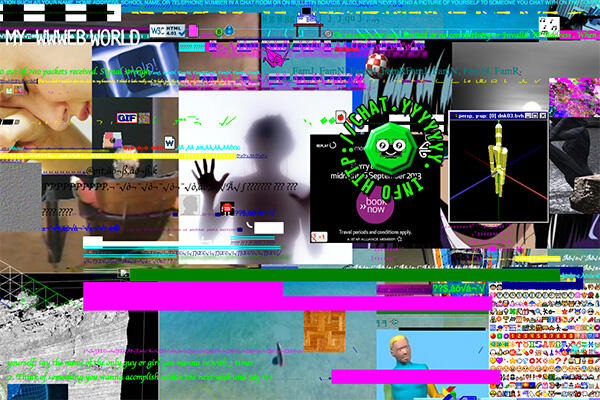
Art both expresses and reflects the society in which it was produced. In an Internet-obsessed society it hardly comes as a surprise, then, that Internet art is thriving. Net art is hard to pin down and categorise, because it is as diverse as the Internet itself. Just like Internet pornography, there’s something for everyone. There are: - shrines to cats rendered in amateurish gifs and HTML; - glitch videos that look like a pack of highlighters mated with TV static; - 3D rendered visuals that look like a mash-up of naked Sims, and even - browser extensions that promise to eradicate Justin Bieber from your Internet experience. One pair of artists even staged a suicide scene and broadcast it on Chatroulette, filming peoples’ reactions. A look at some of the most popular Internet artworks can leave you confused, uneasy, and asking “is it art?” All this has happened before, though, and will happen again. Contemporary Internet art takes many cues from Dadaism, the art movement that culminated in 1917 when Marcel Duchamp shocked the art community and forced it to question what exactly art is. His infamous artwork “Fountain” (a porcelain urinal tipped on its side and plonked in an art gallery) expanded the boundaries of the art world, and art has become increasingly weirder since. With the invention and popularisation of the Internet since the early 90s, artists have found a whole new medium to play with – forget the tempera, brushes, clay, or Perspex: Internet artists use pixels and code to create surreal, blasphemous, absurd, queer creations. It is often hard to tell the difference between Internet art and poorly photoshopped cat pictures cobbled together and posted on Tumblr. Internet art is kitsch, ironic, and meta in the extreme. Yung Jake’s piece Datamosh (look it up on YouTube) sums it up best: “You thought it was an accident, a video glitch. I did it on purpose though … it’s nothing. You don’t have bad Internet, I’m just datamoshing (swag) I’m on my web shit, ya heard me? It’s cool cause its nerrrrdyyyyy.” Yung Jake drawls these lyrics tonelessly over a video that looks like the Internet (circa 2001) took an acid trip. Nostalgia, irony, and meta mingle in net art to produce a body of work that sums up contemporary culture in a way that artists like Andy Warhol and Robert Rauschenberg did in the 50s and 60s. Greg Leuch’s project “Shaved Bieber,” a browser extension that promises to eradicate Justin Bieber from your Internet experience, comments on society’s relentless obsession with Justin Bieber, and, in turn, our weariness with Bieber’s overexposure. Looking deeper at net art, the dichotomy between maximalism and minimalism has become a recurring theme. Take Michael Guidetti’s yyyyyyy.info for example – visit the site and you’ll see the hyper-coloured flotsam and jetsam of the Internet heaped on a page in all its weird glory. There’s a glut of visual noise; maximalism indeed. But take a look at the source code behind the mess and you’ll find a neatly structured, very basic HTML document creating the bones for the absurd facade. Even the CSS is pared back, relying on (now antiquated) web-safe colour standards and generic fonts. Net art is intriguing and disturbing. It’s exciting to see what artists can create with the Internet, but it can be sickening when those artworks cause you to ask some deep questions about yourself and your society; Eva and Franco Mattes’ piece “No Fun,” which recorded Chatroulette participants’ reactions to a staged suicide, makes you wonder about peoples’ respect and concern for fellow human beings. Art holds a mirror up to society, and Internet art does a particularly good job at reflecting ours in a very “warts-and-all” manner. If you’re not the type to visit galleries, you might like to delve a little into the weird world of Internet art. Skip Buzzfeed for an evening and Google a few of these artists: - Eva and Franco Mattes - Yung Jake - Lorna Mills (she posts on Google+ - I can’t figure out if that’s making a statement or not) - Michael Guidetti’s yyyyyyy.info
-
Culture
Issue 22 08/09/2013
Wiki of the Week
In researching this piece I came across a wiki as deliciously pitiful as Conservapedia, if not more so. The Internet Movie Firearms Database (imfdb.org) is why GCSB watch-lists may be justified after all (just kidding, they aren’t). This careful, meticulous cataloguing of weapons of personal destruction is a bang-bang fetishist’s wet dream. Want to know which guns featured in 1974 Murder on the Orient Express? Of course you don’t – you’re probably too busy cleaning your Colt 45 and thinking that if your flatmates mess up the kitchen ONE MORE TIME you might need to throw it in the Leith. But just in case you did want to know, it’s all here on the IMFDB. Articles for each film, video game or television show come fully loaded with obsessively captured screenshots. You can just imagine the heavy breathing of a top contributor, frantically hitting the pause button (like a gunpowder infused snap), capturing that perfect Glock shot and taking notes. With over 13,000 articles, and 9,000 gun-totin’ Facebook fans, the IMFDB really puts that overly long Coro St article on Wikipedia into psychotic relief.
-
Culture
 Issue 21 01/09/2013
App of the Week | Issue 21
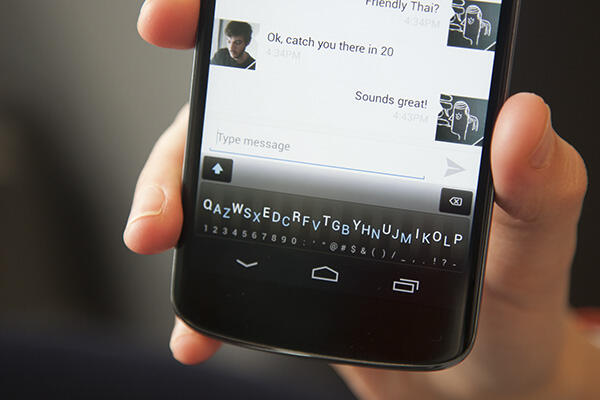
The QWERTY keyboard as we know it has been around since 1873. A lot of shit has happened since then. Women got the vote, man went to the moon, computers were invented and became smaller and smaller, and twerking became an amusing pastime. But despite many changes in device shape, size, and manner of input, the QWERTY keyboard has remained the same. Isn’t that a little ridiculous? Tapping away at a standard keyboard on a phone or tablet is cumbersome and annoying – the keyboard takes up half the goddamn screen! Luckily, some techy-types in Toronto decided that it was time to, if not re-invent the keyboard, at least make it a bit more suited to modern typing. The Minuum keyboard is the result, and it’s in beta release in the Play Store. The Minuum keyboard takes the QWERTY keyboard and smooshes it all down into a single strip of letters. Imagine a kid writing out the alphabet, but instead of the standard A-Z, he or she follows the QWERTY layout. To use the keyboard, tap your fingers vaguely in the right area for the letter you need, and Minuum’s sophisticated algorithms will figure out the word you’re trying to type. You can type quickly and accurately without sacrificing half your screen space for a clunky old QWERTY. Even better, Minuum learns your name, your friends’ names, and the words you use often and adjusts its algorithms accordingly. So, the more you use the keyboard, the better it gets. There’s a bit of a learning curve to get used to Minuum, but if you’re a confident touch-typist, it’s a fairly small one. Minuum also detects when you are entering a URL or password, and automatically switches to a standard QWERTY layout for complete accuracy. You can customise Minuum by configuring gestures (swipe backwards to erase a word, swipe forwards to enter a space), and setting the height of the keyboard. Minuum currently only supports English, with more language support coming soon. The Minuum team are working on expanding the project to other devices (Windows Phone, iOS), as well as wearable devices such as Google Glass, smart-watches, and whatever else the future holds. At NZ$4.76 the keyboard is a little pricey, especially as it’s a beta release, and there is currently no try-before-you-buy option. But if you’re excited about a bit of revolution in the keyboard scene (and if you’re not, the video on Minuum’s website will get you there) it might just be worth it.
-
Culture
 Issue 21 01/09/2013
Facebook’s Particular Shade of Blue
Wake up in the morning lookin’ like P Diddy, grab my phone and check my Facebook … and learn that Girl Who Was In My Class Last Year “loves Ikea.” Ugh. Who cares? I’ve got the Facebook Blues. That particular shade of blue makes me feel dissatisfied, bored, and a little uneasy. Like many information-overloaded twenty-somethings, I go through cycles of loving and loathing Facebook. First it’s crap, and boring. Then I pare back my friends, hide statuses from sale boutiques and unfollow that stupid meme account. Great, just my friends’ stuff now … but … do I really need to know about their Wednesday night plans? Or their cat’s attachment issues? Sometimes I want to just be rid of the whole thing, but inevitably FOMO (Fear of Missing Out) stops me. FOMO is that nagging little voice in the back of my head that says, “if I delete my Facebook account, people will stop inviting me to things! I won’t hear about that flatwarming, or the casino-themed party!” It’s a little too idealistic to think that people will text, email, or call me to invite me. Be honest – when considering whom to invite to your event, you pretty much just scroll through your Facebook friend list, right? It’s easy to forget those who have opted out. I don’t want to be forgotten. It’s not exactly Facebook’s fault – Facebook is just the much-maligned platform. Though in fact, a thorough read-through of Facebook’s terms of service might make you want to delete your account anyway. The problem is more how we use Facebook; follow a thousand friends and “like” a thousand pages and it’s inevitable that you’ll become exhausted. Pare your account back to just the essentials and it becomes boring. But cut yourself off and you miss out on opportunities … right? Well, maybe not. Maybe my FOMO voice is just sensationalising things. If you’re feeling a bit like I am, take a holiday from Facebook. Make it a week, or two. Nothing drastic, just a quick breather. Uninstall the app, unlink your Pinterest/ Goodreads/ whatever other accounts, and banish that particular shade of blue from your life – hell, replace it with that Twitter shade of blue if you like. Just for a little while … you can always go back, and maybe you’ll return with a little more perspective.
-
Culture
Issue 20 18/08/2013
Loved up and ‘Appy
Don’t you hate it when your significant other plays relationship games with you? Like the ever-popular “figure out why I’m angry, or else” move, or the infuriating “do you think that guy’s hotter than me?” test. Answer correctly, or risk the silent treatment. Forget all that, now there’s an app that turns your relationship into a game for both of you to play, and it’s called Kahnoodle (iOS/Android in development; https://www.kahnoodle.com/app/). Kahnoodle encourages you to do nice things for your significant other in order to fill up your “love tank” (not a euphemism). You can earn points (called kudos), which you can then redeem for Koupons. Koupons range from sweet to saucy: have a picnic! Make a sex tape! Oral sex! If your sex life is waning, the app can send you push notifications to initiate sex. I don’t know about you, but nothing gets me wet like an instruction from my phone to get it on before my love tank runs dry (still not a euphemism). Kahnoodle apparently wants to make maintaining your relationship “automatic and easy,” and this is where it fails in my opinion. It’s nice when relationships are easy, but rough patches are an important part of relationships. Rough patches, and getting over them, allow you to re-evaluate your relationship every so often, talk about what’s pissing you off, and reconnect. Automating a relationship is completely counter-intuitive. Relationships aren’t automatic! It takes effort and thoughtfulness to keep a great relationship going, and having an app remind you to do nice things for your partner completely dulls the reward. If a couple needs to work on reconnecting with one another, they should of course do so. But using Kahnoodle is not the way to do it! Using Kahnoodle shifts your relationship from being intrinsically motivated (doing things because they bring you pleasure) to being extrinsically motivated (doing things to obtain points and rewards). Ultimately, intrinsically motivated acts are more emotionally rewarding. Although I’m outraged at this shallow and flawed app, I shouldn’t be surprised that it exists – it’s tied to an American “concierge” service that users pay to arrange dates (activities, not people!) for them. Call them up, talk about your interests and budget, and they’ll arrange something for you and your date. The app ties in by flogging discounts on flowers and meals. Apparently nothing is sacred. If your relationship does need a little help, put your phone down, turn it off and pay some attention to your significant other. In return, they might initiate sex or cook you a meal without the seedy exchange of a Koupon being necessary. Not all couples apps are bad, though – Avocado (iOS/Android; https://avocado.io/) is a better option for keeping your relationship ‘appy. This is the app for you if you and your significant other are “that couple” on Facebook. You know – the couple with posts all over each other’s timelines, the cutesey messages, the smooching photos. If you are guilty of this, please stop it. Keep that shit off Facebook! It’s time to get a (virtual) room. Avocado is that very room: it creates a private social network for you and your lover. You can message each other, share pictures, sync calendars and share shopping lists. There’s even a “draw something” option so that you can send each other silly doodles. You can also send virtual hugs and kisses by … umm … hugging and kissing your phone. Couple (iOS/Android http://couple.me/) is a similar, but less adorable, app that adds the extra option to send Snapchat-like self-destructing pictures. No more worrying about accidentally sending your nudie to your sister. Couple’s virtual kiss function is a bit less weird than Avocado’s – you both touch your screens in the same spot at the same time and it will make your phones vibrate. Awwww. These apps aren’t for every couple, but they definitely have their place. If your relationship is long distance, or you and your partner just like to share a lot, look into Avocado or Couple. They’re fun and private, and you won’t gross out all your Facebook friends with your frequent outpourings of love.


